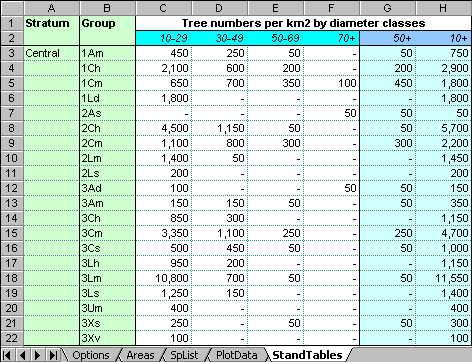
The stand tables produced by the MYRLIN stand table module (MYRLIN#1) appear as shown above. The first column contains the block or stratum. One table is produced for each block. The second column contains the species groups. Individual species tables can be produced by selecting the species as the grouping column on the Options form.
The diameter classes used are flexible, and are determined by the headings in row 2. These can be edited to contain values in either of the following formats:
| Normal diameter classes |
In this format, the class will include all trees from a lower diameter to an upper diameter. For the example, if 20-39 is specified, then trees from 20.00 to 39.99 would be included in the class. Columns C:E in the above table are in this format. Consecutive class could overlap, although this would result in double counting of trees. Equally there could be gaps between classes, so that some trees are not shown. Classes do not need to be in ascending order. MYRLIN will process the data in either case. Normal usage requires that adjacent classes should be in ascending order, without gaps or overlaps in the size ranges, as in the above example. |
| Cumulative diameter classes | These classes will include all trees of and above the specified size limit. Columns F:H in the above example are of this type. For example, 70+ will include any tree of 70.00 cm or larger. The cumulative classes do not need to be in ascending order. |
The colouring and outlining in the StandTables worksheet shown above is done manually, after the table has been produced. Existing formats and colours will be left unchanged when a table is updated.
MYRLIN#1 is designed as a flexible stand table tool. However, if the stand table is to be copied into the MYRLIN#3 harvesting model, some restrictions must be applied to column formats:
A good set of class specifications for modelling purposes is
10-19, 20-29, 30-39, 40-49,50-59, 60-69, 70-79, 80-89, 90+.
The downloaded version of MYRLIN#1 has these classes set up in the StandTables sheet.
However, for publication of growing stock information, for example in a management plan, it is clearer to use fewer classes. These should correspond to significant silvicultural and harvesting sizes. The example shown in the figure above would be more appropriate for such a context. Both sets can be maintained in the MYRLIN#1 tool, and updated by changing the stand table sheet name on the Options form, cell B14.
Note that when entering some range values, eg 10-19, Excel may attempt to convert them to a date, giving 19-Oct, or a large integer number, depending on the cell format being used by default. To prevent this, start the entry with a single apostrophe, as: '10-19. This will always be correctly rendered.